Starting in 2026, a new set of international guidelines for public kiosks—ranging from transit ticket machines to government service terminals—will be implemented to ensure that digital infrastructure is truly inclusive for all age groups. These standards, influenced by the International Organization for Standardization (ISO) and regional accessibility acts, prioritize physical ergonomics, cognitive clarity, and sensory support. For adults aged 60 to 80, this shift means less frustration, more independence, and a standardized experience regardless of the country you are visiting or living in.
- Standardized Interfaces: The 2026 guidelines mandate high-contrast visuals, consistent button placement, and simplified navigation paths to reduce cognitive load.
- Ergonomic Accessibility: New kiosks must include adjustable heights and physical feedback mechanisms to accommodate varying levels of mobility and grip strength.
- Multi-Sensory Options: Requirements now include mandatory headphone jacks for audio guidance and tactile markers for users with low vision or hearing impairments.
Understanding the 2026 Global Accessibility Pivot
The push for these 2026 standards stems from a recognition that global populations are aging, yet public infrastructure has historically favored younger, tech-native users. The new guidelines are not merely suggestions; they are increasingly being written into procurement contracts for municipal and private service providers. When a city updates its transit system or a hospital installs new check-in terminals, they must now meet specific “Senior-Friendly” criteria to receive certification.
Why does this matter for you? In the past, kiosks were often designed with tiny text, complex nested menus, and fast-moving timers that caused unnecessary stress. The new standards aim to eliminate these “digital gatekeepers.” By 2026, you can expect a more predictable interaction model. If you learn to use a kiosk in a train station in London, the logic of the interface should be fundamentally similar to a library kiosk in Sydney or a pharmacy terminal in Tokyo.
The Physical Ergonomics of the New Kiosk Design
Physical discomfort is one of the primary reasons older adults avoid using public kiosks. Whether it is a screen that is too high, a touch-sensitive button that requires too much force, or a lack of support for those using canes or walkers, physical design is the first barrier to entry. The 2026 guidelines address this through strict physical requirements.
Adjustable Height and Reach
The “reach-range” for a kiosk is being standardized. Under the new rules, the primary interaction zone must fall between 800mm and 1,200mm from the ground. This allows a person seated in a wheelchair or a person of shorter stature to interact with the screen without straining. Furthermore, many new kiosks will feature “tilt-adjustment” screens, allowing the user to angle the display to reduce glare from overhead lighting—a common issue for those who wear bifocals or progressive lenses.
Tactile and Haptic Feedback
Touchscreens can be notoriously difficult for those with reduced tactile sensitivity. The new standard requires that screens provide “haptic feedback”—a subtle vibration when a button is successfully pressed. This provides clear confirmation that an action has been registered, removing the common mistake of pressing the same button multiple times and accidentally cancelling a transaction.
| Feature | Previous Standard | 2026 Guideline | Benefit to User |
|---|---|---|---|
| Screen Height | Fixed (often too high) | 800mm – 1,200mm range | Reduced shoulder/neck strain |
| Interaction Feedback | Visual only | Visual + Haptic/Audio | Clear confirmation of input |
| Glare Control | Standard glass | Anti-glare, matte finish | Improved readability in light |
Cognitive and Visual Clarity: Making the Interface Intuitive
Beyond the physical machine, the software running on these kiosks is undergoing a mandatory “simplification overhaul.” The 2026 guidelines focus on “Cognitive Accessibility,” ensuring that users are not overwhelmed by choices or rapid-fire prompts.
The “Three-Click” Rule
One of the most significant changes is the adoption of the “Three-Click Rule.” Service providers are encouraged to structure their workflows so that a user can complete a standard task (such as printing a ticket or paying a utility bill) within three main interactions. If a process requires more steps, the system must provide a “Save Progress” or “Go Back” button that is permanently fixed in the same location on the screen, preventing the user from getting “lost” in a digital loop.
High-Contrast Visuals and Font Scaling
The days of light-grey text on a white background are coming to an end. The 2026 standards require a minimum contrast ratio of 7:1 for all text. Furthermore, kiosks must provide a “Large Text” mode that can be toggled on from the very first screen. This is not just a font size increase; it is a full interface reflow, ensuring that buttons remain reachable and that the text does not overlap with other graphical elements when scaled up.

For those with hearing loss or visual impairments, kiosks have historically been inaccessible. The 2026 guidelines introduce mandatory “Assistive Mode” features across all public-facing terminals. This is a massive leap forward for digital inclusion.
Standardized Audio Jacks
Every kiosk will now be required to have a standard 3.5mm headphone jack. When a user plugs in their own headphones, the kiosk will automatically enter “Private Audio Mode.” In this mode, the machine will read out the menu options and confirm selections verbally. This allows for private, secure, and stress-free transactions, as the user does not need to worry about others overhearing their personal details or the noise of a crowded station distracting them.
Visual Indicators for Progress
For users who are hard of hearing, visual indicators are being standardized. Instead of relying on beeps, kiosks will use light-based cues—such as a green flash around the frame of the screen—to indicate a successful transaction, and a pulsing amber light to indicate that the system is waiting for the user to perform an action. These visual signals are universal, meaning they do not rely on language proficiency.
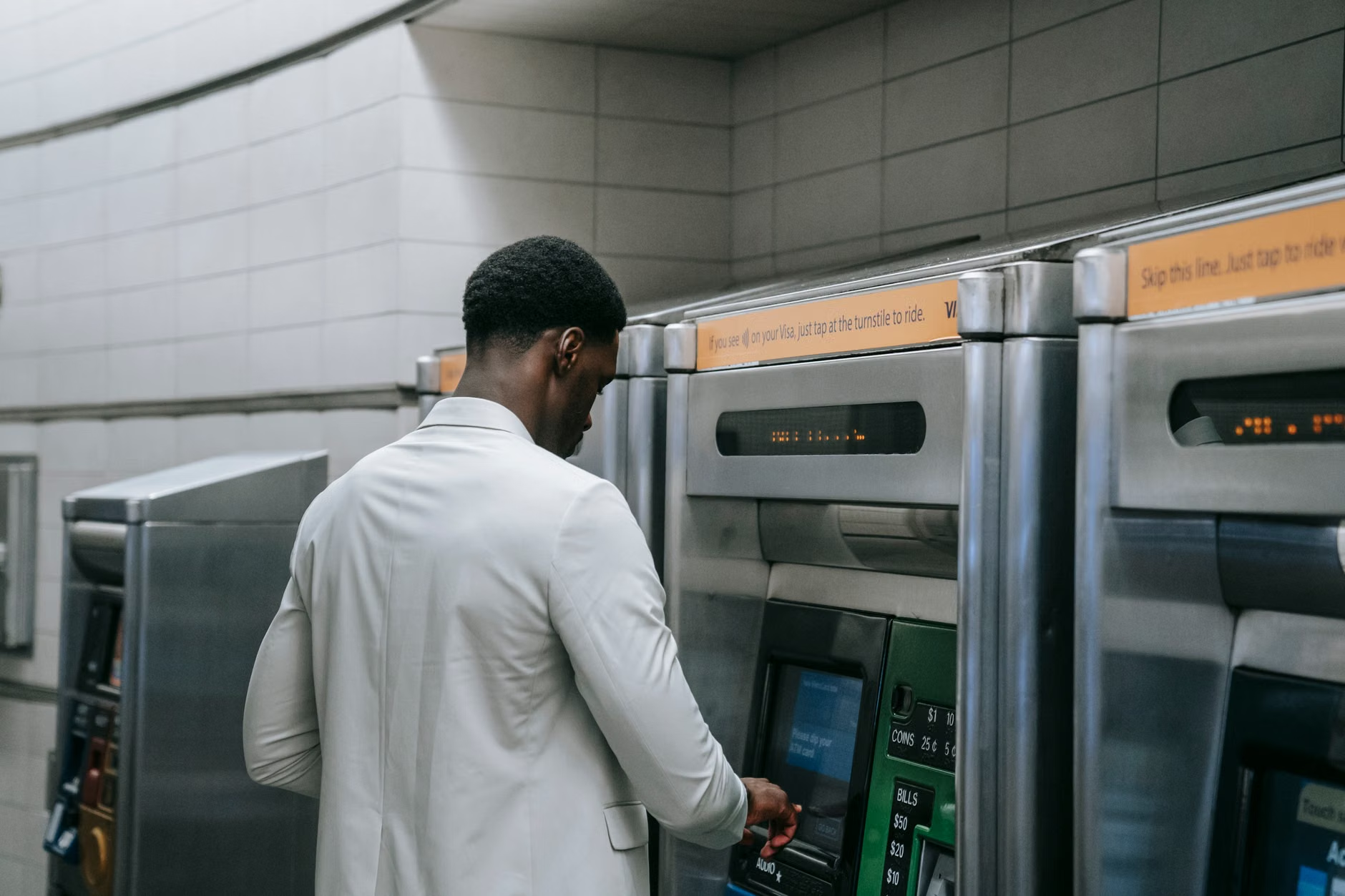
Practical Steps to Prepare for the 2026 Rollout
While these changes are designed to make your life easier, there is always a learning curve when new technology is introduced. Here is how you can prepare to make the most of these updated public tools.
- Carry Your Own Headphones: Since many kiosks will now support audio assistance, keeping a pair of wired, standard 3.5mm headphones in your bag will allow you to access enhanced accessibility features in any public setting.
- Look for the “Accessibility” Icon: When you approach a new terminal, look for the universal accessibility symbol (the person in a circle). This is where you will find the controls for screen magnification, audio mode, and height adjustment.
- Check for “System Status” Before Beginning: If a kiosk looks like it has been updated, it will likely have a “Help” or “Demo” button on the welcome screen. Spending 30 seconds in the demo mode can save you minutes of frustration when you actually need to complete a task.
- Prepare Your Documents Digitally: If you are using a kiosk for government services, ensure you have your ID or account information in a clear, easy-to-access format. Even with better interfaces, having your information ready reduces the time the kiosk timer stays active.
Addressing Common Misconceptions
There is a common belief that “accessible” means “slower.” In reality, the 2026 guidelines are designed for efficiency. By removing unnecessary animations, pop-up advertisements, and confusing sub-menus, these kiosks are actually faster to use than their predecessors. Another misconception is that these kiosks are only for those with severe mobility or vision issues. These features are “Universal Design”—they benefit everyone, including a person with a heavy shopping bag, someone trying to use a kiosk in bright sunlight, or a tourist who does not speak the local language fluently.
The Future of Public Service Interaction
The move toward these 2026 standards represents a broader shift in how society views public services. We are moving away from a model that asks the citizen to “adapt to the machine” and toward a model where the machine is required to “adapt to the citizen.” By understanding these standards, you can approach public kiosks with confidence, knowing that they have been designed with your needs, comfort, and independence in mind.
As these kiosks begin appearing in your city, remember that you have the right to request assistance if a machine is not functioning according to these new standards. Most jurisdictions that are adopting these ISO-aligned guidelines also have reporting mechanisms for non-compliant terminals. If a kiosk is consistently difficult to use, reporting it helps ensure that local authorities hold manufacturers accountable for the new, higher standards of service.
Frequently Asked Questions
Will these changes apply to all kiosks immediately in 2026?
Most regulations apply to new installations starting in 2026. Older kiosks may not be retrofitted immediately unless they undergo significant maintenance or software updates. Check for the accessibility symbol on the terminal to see if it meets the new standards.
Are these guidelines universal across all countries?
These guidelines are based on international standards (ISO/IEC), which many countries adopt as their national law. However, local enforcement can vary. In the EU, for example, the European Accessibility Act mandates strict compliance, while in other regions, implementation may be phased in over several years.
What should I do if a kiosk is not working properly?
If you encounter a kiosk that is difficult to use, look for a “Report Issue” or “Maintenance” contact number on the machine. Additionally, most transit hubs and government offices have a help desk nearby. Providing specific feedback—such as “the text was too small” or “the screen height was not adjustable”—is helpful for the maintenance team to prioritize necessary upgrades.
Official Resources for Further Reading:
– International Organization for Standardization (ISO) Accessibility Guidelines
– European Accessibility Act (EAA) Implementation
– Web Accessibility Initiative (WAI) – Standards for Digital Interfaces