- Biometrics are your strongest defense: Using fingerprint or facial recognition is significantly safer than relying on passwords alone for banking apps.
- Multi-Factor Authentication (MFA) is non-negotiable: Ensure every financial account requires a second form of verification, such as an app-generated code or security key.
- Verify through official channels: Never trust unsolicited messages, calls, or emails that request login credentials or immediate fund transfers; always contact your bank through their verified, official website or phone number.
2026 Digital Banking Security: A Practical Guide to Protecting Your Assets
As we move through 2026, the landscape of personal finance has shifted almost entirely to digital platforms. While the convenience of managing pensions, investments, and daily expenses from home is undeniable, it requires a proactive approach to security. Protecting your assets in the digital age is not about being “tech-savvy”; it is about adopting a series of deliberate, repeatable habits that make your accounts resilient against unauthorized access.
This guide provides a comprehensive framework for securing your financial life. We will move beyond generic advice to examine the specific tools, protocols, and habits that define high-level security in 2026.

Understanding the Current Threat Landscape
In 2026, the primary threat to your digital assets is not a “hacker” in a dark room, but rather sophisticated social engineering. Criminals no longer try to break into bank servers; instead, they attempt to trick account holders into providing the keys to their own accounts. This often happens through “phishing” (fraudulent emails) or “smishing” (fraudulent text messages) that mimic official communications from your bank or government tax office.
The danger lies in the high level of realism these messages now possess. By 2026, many fraudulent messages use AI-generated language that perfectly mimics the tone and branding of legitimate institutions. Understanding that your bank will never ask for your password, PIN, or a one-time security code via text or email is the first line of defense.
The “Human-in-the-Loop” Security Model
Security is most effective when it combines automated technology with human vigilance. Your bank provides the technology, but you provide the final verification. If you receive a notification that looks urgent—such as a notice about a suspicious transaction—do not click any links in the message. Instead, close the app, open your banking application directly from your phone’s home screen, or type the bank’s official web address into your browser manually. This ensures you are interacting with the genuine service.
Establishing a Robust Authentication Protocol
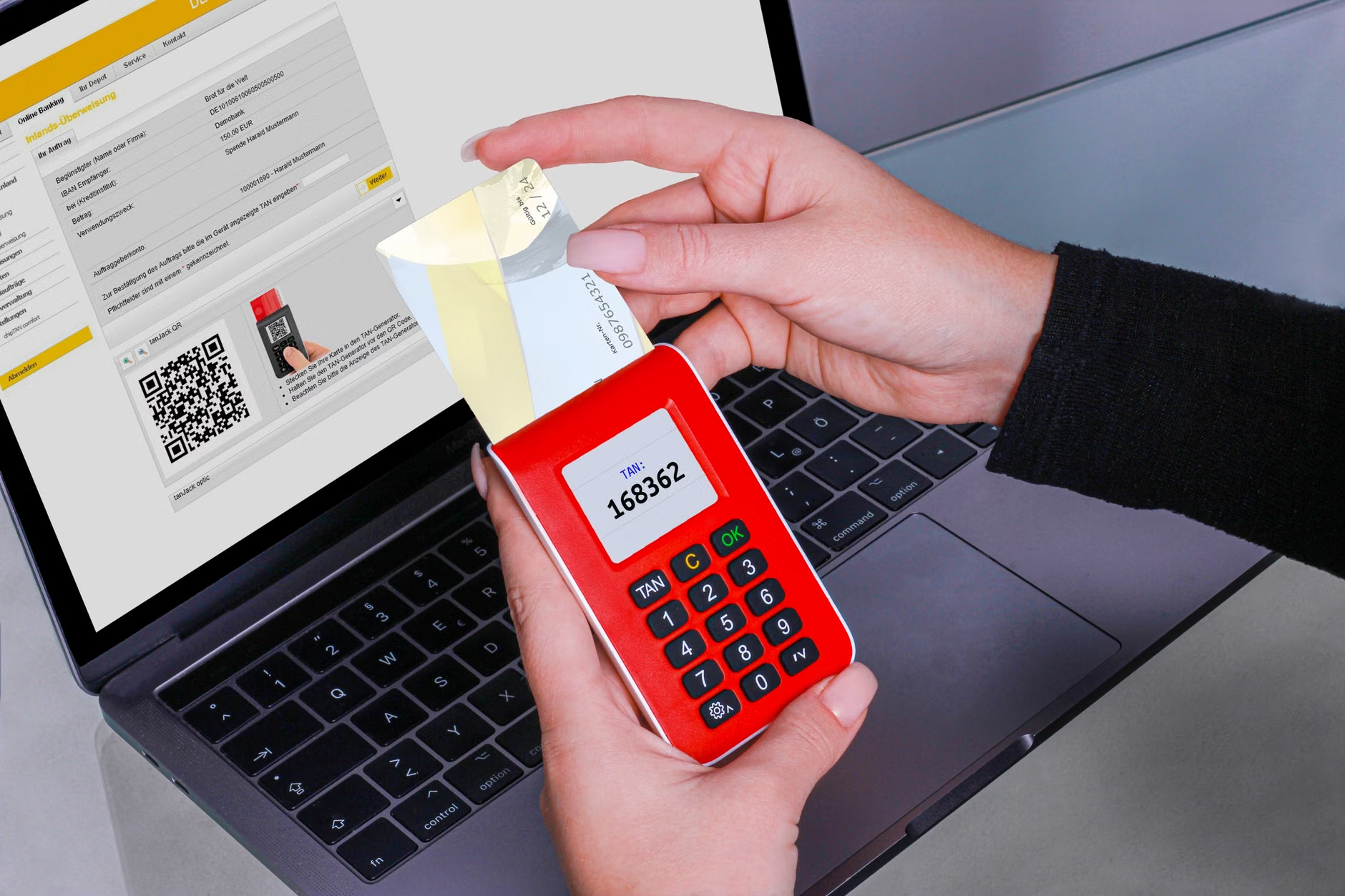
Authentication is the process by which you prove you are the owner of an account. In 2026, relying on a single password is a significant security risk. The modern standard is Multi-Factor Authentication (MFA), which requires two or more pieces of evidence to prove your identity.
Tiered Authentication Strategies
To maximize security without sacrificing usability, consider the following hierarchy of authentication methods:
| Method | Security Level | Suitability |
|---|---|---|
| Password Only | Low | Never recommended for banking. |
| SMS/Text Code | Moderate | Better than passwords, but vulnerable to SIM-swapping. |
| Authenticator App | High | Generates codes locally on your device; highly recommended. |
| Biometric (Face/Fingerprint) | Highest | Fast, secure, and tied to your physical presence. |
For most users, using a combination of biometrics to enter the app and an authenticator app for higher-risk transactions (like adding a new payee) is the gold standard. Avoid using SMS-based codes whenever an app offers an authenticator app or security key option. SMS codes can be intercepted by sophisticated attackers who gain control over your phone number.
Managing Digital Credentials Safely
One of the most common mistakes is using the same password across multiple websites. If one minor site is breached, attackers will immediately test that email and password combination on your banking portals. To prevent this, you must use unique, complex passwords for every single site.
The Role of Password Managers
Trying to memorize dozens of complex passwords is not realistic. A password manager is an encrypted digital vault that stores all your credentials. You only need to memorize one “master password.”
How to choose a password manager:
- Look for “Zero-Knowledge” encryption: This means even the company that provides the software cannot see your passwords.
- Syncing: Choose one that works across all your devices (smartphone, tablet, and computer).
- Ease of use: Many modern managers offer “auto-fill” features that insert your credentials automatically, preventing you from having to type them manually and reducing the risk of being watched.
Recognizing and Avoiding Financial Scams
In 2026, financial scams are increasingly personalized. Attackers may gather information about your interests or recent purchases from social media to make their fraudulent communications seem more credible. This is known as “spear-phishing.”
Common Red Flags
If you encounter any of the following, treat the communication as a potential threat:
- Artificial Urgency: Messages that claim your account will be “locked” or “deleted” within a few hours unless you act immediately. Legitimate institutions provide reasonable timeframes for security updates.
- Unsolicited Requests for Remote Access: Never allow anyone to “assist” you by remotely accessing your computer or phone. No legitimate bank employee will ever ask to take control of your device to “fix” an account issue.
- Requests for Payment in Unusual Ways: If a contact asks for payment via gift cards, cryptocurrency, or wire transfers to an unfamiliar account, it is a scam.
If you suspect a scam, do not engage. Hang up the phone or delete the message. If you are concerned, call your bank using the phone number printed on the back of your physical debit or credit card. Never use a phone number provided within the suspicious message itself.
Working with Family and Caregivers
For many, managing digital assets is a shared responsibility. If you rely on a family member or a caregiver to help you manage your finances, it is vital to maintain transparency while keeping your individual security intact.
Establishing Secure Access for Trusted Individuals
Never share your primary banking passwords with anyone, even family members. Instead, explore these safer alternatives:
- Authorized User/Joint Accounts: Most banks allow you to add a trusted family member as an authorized user or joint account holder. This gives them their own login credentials, allowing them to assist you without needing your password.
- Power of Attorney (POA): Ensure your legal documents are up to date. A formal POA allows a designated person to act on your behalf legally, which is the standard way to handle long-term financial management.
- Regular Audits: Even if someone helps you with your finances, schedule a monthly “financial review” meeting. Sit down with your records to ensure all transactions align with your expectations.

Securing Your Devices
Your bank account is only as secure as the device you use to access it. If your smartphone or tablet is infected with malware, your credentials can be stolen regardless of how strong your password is.
Essential Device Hygiene
- Keep Software Updated: Always install operating system updates (iOS or Android) immediately. These updates often contain critical security patches that fix vulnerabilities discovered by researchers.
- Avoid Public Wi-Fi for Banking: Never access your bank accounts while connected to public Wi-Fi at cafes, airports, or hotels. These networks are often insecure. Instead, use your phone’s cellular data (4G/5G) or a private, password-protected home network.
- Use Security Software: While modern mobile operating systems are secure, using a reputable mobile security app can provide an extra layer of protection by scanning for malicious apps or dangerous websites.
Responding to a Potential Security Incident
If you suspect that your account has been compromised, speed is essential, but panic is your enemy. Follow a structured, calm response plan.
- Contact Your Bank Immediately: Call the official customer service number. Most banks have a 24/7 fraud department. Ask them to freeze your accounts and issue new cards if necessary.
- Change Your Credentials: Once you have secured your accounts with the bank, change the password to your primary email account and your banking portal. Use your password manager to generate a strong, unique password.
- Check Your Credit Report: If you believe your identity has been stolen, contact the credit bureaus in your jurisdiction to place a “fraud alert” or “credit freeze” on your report. This prevents new accounts from being opened in your name.
- Document Everything: Keep a record of the time and date of the incident, whom you spoke with at the bank, and any reference numbers provided.
The Future of Digital Banking: What to Expect
As we look toward the latter half of the 2020s, we will see the rise of “Behavioral Biometrics.” This is a security feature that learns your habits—such as how you hold your phone, the speed at which you type, and the typical way you navigate your banking app. If an attacker gains access to your account, the bank’s systems may detect that the “behavior” does not match your profile and trigger additional security checks automatically.
Embracing these advancements, while maintaining the foundational habits outlined in this guide, will ensure that you remain in control of your financial future. Digital banking is a tool for independence; by securing it, you protect that independence for years to come.
Additional Resources and Official Guidance
To stay informed about the latest security practices, consult the official resources provided by your country’s financial regulators. For example, in the United States, the Consumer Financial Protection Bureau (CFPB) provides extensive resources on digital security. In the United Kingdom, the Financial Conduct Authority (FCA) offers guidance on protecting against financial scams. Regardless of your location, your national central bank or financial regulatory body is the most reliable source for security best practices.
Always prioritize information from government-backed financial websites over third-party blogs or advertisements.
Frequently Asked Questions
1. Is it safe to use my bank’s mobile app on my smartphone?
Yes, mobile banking apps are generally highly secure, often more so than web browsers. They use encrypted connections and advanced biometric authentication. The risk usually stems from the device itself being compromised by malicious apps or unprotected Wi-Fi. Ensure your smartphone’s operating system is always updated and avoid downloading apps from unofficial sources.
2. What should I do if I receive a text message claiming to be from my bank?
Treat any unsolicited text message as suspicious. Even if it appears to come from a known number, it could be a “spoofed” message. Never click any links in the text. If you are concerned, call your bank using the phone number found on the back of your debit card or on your latest paper statement. Never use contact information provided within the text message itself.
3. How often should I change my online banking passwords?
In the past, it was common advice to change passwords every 90 days. However, modern security experts now recommend that you only change your password if you suspect it has been compromised or if you are alerted to a breach on a service where you used that password. Instead of frequent changes, focus on making your current password long, unique, and stored in a secure password manager, and always enable multi-factor authentication.
Disclaimer: This article is for informational purposes only and does not constitute financial or legal advice. Always consult with your bank’s official security resources or a qualified professional regarding your specific financial situation.